What WHOIS Data Actually Tells You - And What It Doesn't Published: 15 Mar, 2026
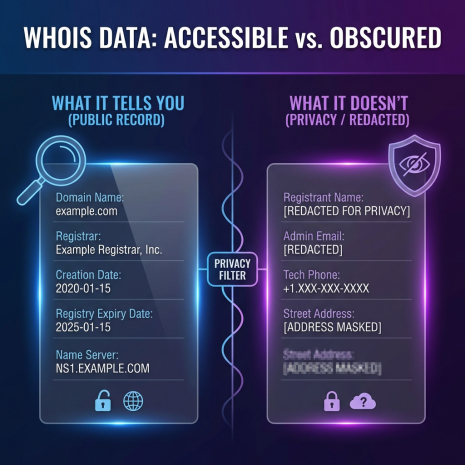
What WHOIS Data Actually Tells You - And What It Doesn't
Most people who run a WHOIS lookup for the first time walk away with one of two reactions. Either they're surprised by how much information is sitting there in plain view, or they're frustrated because the record they pulled is almost entirely redacted. Both reactions make sense. WHOIS is a genuinely useful tool - but it's also one that's widely misunderstood, partly because what you see depends heavily on when the domain was registered, who the registrar is, and whether the owner paid for privacy protection.
This guide is about understanding WHOIS properly: what the data actually means, where it comes from, why some of it disappears, and how to get the most out of a lookup even when the obvious fields are hidden.
Where WHOIS Data Comes From
WHOIS is not a single database. It's a protocol - a standardized way of querying a distributed network of registries and registrars, each maintaining their own records. When you register a domain, the registrar (the company you bought the domain from) is required to collect your contact details and pass them along to the relevant registry (the organization that manages the top-level domain, like Verisign for .com or Nominet for .uk).
That information then becomes publicly accessible through WHOIS queries. The idea behind making it public was straightforward: if someone is operating a website, there should be a way for other parties - law enforcement, intellectual property holders, network abuse teams - to identify and contact them. The system was designed in the early days of the internet, long before privacy was the concern it is today.
Different TLDs have different WHOIS servers. When you run a lookup on a .com domain, the query goes to Verisign's WHOIS server first to find out which registrar manages that domain, and then to the registrar's own WHOIS server to get the full record. Tools like the one on this site handle all of that routing automatically, so you just type in a domain and get the result.
Breaking Down a WHOIS Record Field by Field
A typical WHOIS record contains several distinct sections. Understanding what each one actually represents - rather than just reading it at face value - makes the data significantly more useful.
Domain Name and Registry Data
At the top of most WHOIS records, you'll see the domain name itself along with a registry domain ID. The ID is an internal reference number assigned by the registry. It doesn't mean much on its own, but it can be useful if you're cross-referencing records or following up with the registry directly.
Registrar Information
This section tells you which company is managing the domain registration - GoDaddy, Namecheap, Google Domains, Cloudflare, and so on. The registrar's WHOIS server address is also listed here, which is where the detailed registration data is held. The IANA (Internet Assigned Numbers Authority) ID is a unique identifier for the registrar within the global domain name system.
The registrar field is more useful than it might look. In cases where you're trying to report abuse, transfer a domain, or dispute ownership, knowing the registrar is the first step. Each registrar has its own abuse contact and dispute procedures.
Important Dates
Three dates appear in almost every WHOIS record, and each one tells you something different:
Creation Date - When the domain was first registered. A domain created in 2003 has a very different profile than one created last Tuesday. Long-established domains generally carry more trust in search engines, and the creation date is one signal used to assess that. It's also relevant in trademark disputes - if a domain was registered before a trademark was filed, that changes the legal landscape considerably.
Updated Date - The last time the registration record was modified. This could be a renewal, a change of registrar, an update to contact details, or a modification to the name servers. A recently updated date on an old domain can sometimes indicate a recent transfer of ownership.
Expiry Date - When the current registration period ends. After this date, the domain enters a grace period during which the current owner can still renew it. Once that grace period passes, the domain moves into a redemption phase and eventually becomes available for anyone to register. The expiry date is the single most important piece of data if you're planning to acquire a domain that's currently taken.
Domain Status Codes
Status codes are one of the most overlooked parts of a WHOIS record. They're listed in an almost deliberately cryptic format - things like clientTransferProhibited or serverDeleteProhibited - but they carry meaningful information about what can and can't be done with the domain right now.
clientTransferProhibited means the registrar has locked the domain against outgoing transfers. This is the default state for most domains and is actually a security feature - it prevents unauthorized transfers. If you're buying a domain from someone, they'll need to remove this lock before the transfer can proceed.
serverDeleteProhibited and serverTransferProhibited are registry-level locks, which are stronger than registrar-level locks. These are sometimes applied to high-value or sensitive domains as an extra layer of protection, and removing them requires action at the registry level rather than just through the registrar.
pendingDelete is a status worth knowing if you're domain hunting. It means the domain's grace period has expired and it's in a queue to be deleted and released back into the pool. The timing of when it actually drops varies by registry.
Name Servers
Name servers are the DNS servers that handle queries for the domain - they're where the domain's DNS records live. The name servers in a WHOIS record tell you, broadly, who is managing the domain's DNS. Cloudflare's name servers look like ns1.cloudflare.com. Amazon Route 53 uses a format like ns-XXXX.awsdns-XX.com. If a domain is using a hosting company's name servers, that gives you a rough idea of where the site is hosted.
Sudden changes in name servers on an established domain - especially if the WHOIS updated date reflects a recent change - can be a signal worth investigating. DNS hijacking attacks often manifest first as unexpected name server changes.
Registrant, Admin, and Tech Contacts
These three contact sections were historically the most useful part of a WHOIS record. The registrant is the domain's legal owner. The admin contact is whoever handles administrative matters for the domain. The tech contact deals with technical issues. In many cases, all three would list the same person or organization.
This is also where WHOIS gets complicated in the modern era.
The Privacy Problem: Why So Much WHOIS Data Is Now Hidden
If you run WHOIS lookups regularly, you've noticed that a large proportion of records now show something like "Data Protected" or list a proxy email address rather than real contact information. This is the result of two converging forces: the introduction of GDPR in May 2018, and the widespread adoption of WHOIS privacy services by registrars.
GDPR - the EU's General Data Protection Regulation - fundamentally changed how personal data can be collected, stored, and published. Publishing someone's name, email, phone number, and home address in a publicly accessible database without their consent became a serious legal liability for registrars operating in or serving customers in Europe. ICANN, the organization that oversees the global domain name system, had to rapidly adapt its policies. The result was that displaying personal registrant data in public WHOIS records went from being mandatory to being restricted.
Separately from GDPR, most registrars now offer WHOIS privacy as a standard add-on - often for free. When enabled, the registrar's proxy service replaces the owner's real contact details with generic information. The domain is still registered to a real person or company, and that information is held by the registrar, but it's no longer visible in the public record.
This is entirely legitimate and is not, by itself, a reason to distrust a domain. The vast majority of privacy-protected domains are owned by perfectly ordinary individuals and businesses who simply don't want their home address or personal email sitting in a publicly searchable database.
That said, privacy protection does limit what you can find through a standard WHOIS lookup. If you need to contact a domain owner and their details are protected, your options are to use the proxy email address shown in the record (if one is provided), attempt contact through the website itself, or - in cases involving legal matters - work through the registrar's official channels to request disclosure of registrant information.
What WHOIS Data Is Useful For in Practice
Despite the limitations introduced by privacy protection, WHOIS data remains one of the most practically useful sources of information about a domain. Here's where it actually gets used:
Domain Acquisition Research
If you want to buy a domain that's already registered, WHOIS is where you start. The expiry date tells you whether you should approach the current owner directly or wait for the domain to drop. The registrar tells you which platform the transfer would need to go through. If contact details are visible, you have a direct line to the owner. If they're protected, the proxy email is still worth trying - many registrars forward messages through that address to the actual owner.
Brand Protection and Trademark Monitoring
Companies with established brands routinely monitor WHOIS data for newly registered domains that incorporate their brand name, especially in combination with words like "support," "official," "login," or common TLD variations. A typosquatted domain - one that resembles a legitimate brand's domain but with a slight spelling variation - is often registered with the intent of phishing, brand impersonation, or redirecting traffic. Catching these early, while the domain is still freshly registered, gives legal teams the best chance of filing a successful UDRP (Uniform Domain-Name Dispute-Resolution Policy) complaint.
Due Diligence on Vendors and Partners
Before entering a significant business relationship, checking the WHOIS record of the other party's domain is a reasonable step. How old is the domain? Does it look like it was set up recently, or has it been active for years? Is the registrant's country consistent with what the company claims? None of this is definitive, but it adds context that can surface inconsistencies worth investigating further.
Security and Abuse Investigation
Network security teams use WHOIS data constantly. When investigating a phishing campaign, spam operation, or malware distribution network, WHOIS lookups help identify patterns - shared registrars, similar registration dates, overlapping contact details across multiple suspicious domains. Even with privacy protection in place, the registrar, creation date, name servers, and status codes are still visible and can reveal useful patterns.
Competitive Research
Knowing when a competitor registered their domain, who their registrar is, and what name servers they're using can add small but meaningful pieces to a larger competitive picture. When did they first acquire their domain? Have their name servers changed recently, suggesting a hosting migration? Has the domain changed hands? These are not headline insights, but for thorough research, they matter.
The Difference Between Registrar WHOIS and Registry WHOIS
One thing that causes confusion is the difference between the registry's WHOIS record and the registrar's WHOIS record. For most lookups, you'll be seeing the registrar's record, which is the more detailed one. But some tools - and some queries - return only the registry-level data, which is thinner. It typically includes the domain status, the registrar name, and the name servers, but not the full contact information.
If a lookup returns less information than you expected, it may be worth checking whether you're querying the registrar's WHOIS server directly. The tool on this site routes to the appropriate server automatically for most TLDs, but for obscure country-code TLDs, the data available can vary considerably depending on that registry's policies.
WHOIS Accuracy: How Much Should You Trust the Data?
ICANN's policies require that registrants provide accurate contact information when registering a domain, and registrars are required to verify it to a reasonable degree. In practice, the level of verification varies. Email addresses are typically confirmed, but physical addresses and phone numbers are rarely checked against any external source.
This means that WHOIS contact data, where it is visible, should be treated as a starting point rather than a verified fact. The email address might be valid. The address might be a PO box, a registered agent's address, or completely fabricated. For high-stakes decisions - legal action, large financial transactions - WHOIS data alone is not sufficient verification of identity.
That said, for the most common use cases - checking expiry dates, identifying registrars, spotting name server configurations, building a general profile of a domain's history - the data is reliable enough to be genuinely useful. The dates, in particular, are pulled directly from registry records and are accurate.
Running a WHOIS Lookup: What to Actually Look For
When you pull a WHOIS record, most people read it top to bottom and close the tab. A more useful approach is to work through it with specific questions in mind:
How old is this domain? The creation date tells you immediately. Anything under six months old deserves a second look if you're assessing trustworthiness.
When does it expire? If you're researching a domain to acquire, this is the most important number on the page.
Has it changed hands recently? Compare the creation date with the updated date. A domain created in 2010 with an updated date from last month may have been recently transferred or had its ownership changed.
What do the name servers tell you? Unusual or unfamiliar name servers on an established domain can be a warning sign. Name servers that match a known CDN or hosting provider are a normal sign.
What's the status? If you're buying a domain, check for transfer locks. If you're investigating a suspicious domain, pendingDelete or unusual status combinations are worth noting.
Is the contact data real or protected? If it's protected, that tells you the owner is using a privacy service but doesn't tell you much about intent. If real data is visible, check whether it's internally consistent - does the country match the language of the website? Does the organization name match what the site presents itself as?
WHOIS is not a magic revealer of hidden truths. But used thoughtfully, with an understanding of what the data actually represents and where its limitations lie, it's one of the most consistently useful tools available for anyone working with domain names professionally.