Reverse IP Lookup: What It Is, How It Works, and When You Actually Need It Published: 15 Mar, 2026
Reverse IP Lookup: What It Is, How It Works, and When You Actually Need It
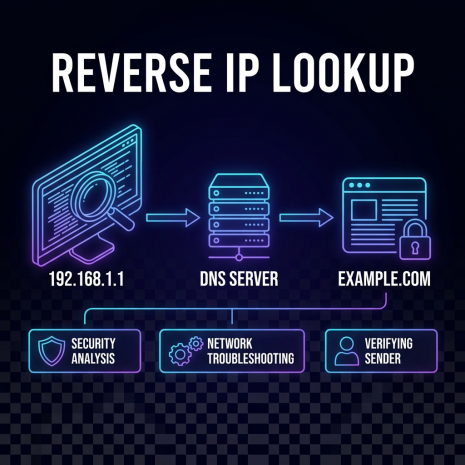
Most people are familiar with the idea of looking up an IP address for a domain - you have a website name and you want to know the server behind it. Reverse IP lookup flips that around. You start with an IP address and find out which domains are hosted on it. It sounds like a minor variation, but the use cases are genuinely distinct and, in certain situations, the reverse direction is the only way to get the information you're after.
The Basic Mechanics
When a domain is set up to point to a server, an A record is created in the domain's DNS configuration mapping the domain name to the server's IP address. Standard DNS lookup reads this in the forward direction: domain → IP. Reverse IP lookup works by querying databases that index which domains resolve to a given IP address.
There is no single authoritative reverse IP database the way there is for WHOIS or forward DNS. Reverse IP data is compiled by services that crawl the web, scan IP ranges, and track DNS configurations over time. The completeness of results varies between tools - a reverse IP lookup on a major IP address might return hundreds of domains from one source and a different set from another, depending on how each provider built and maintains their index.
This means reverse IP lookup results should be treated as a useful sample rather than a definitive exhaustive list. You'll find most of the prominent domains sharing an IP, but a long tail of smaller, less-trafficked sites may not appear.
Shared Hosting and What It Actually Means
The scenario where reverse IP lookup is most immediately illuminating is shared hosting. On a shared hosting server, dozens, hundreds, or sometimes thousands of different websites run on the same physical machine and share the same IP address. From the outside, all of those sites look like they're on separate servers - they have different domain names and different web content. But they share an IP.
A reverse IP lookup on a shared hosting IP will return a list of all the domains pointing to it, which gives you a picture of who your neighbors are on that server. This has practical implications in a few directions.
From a performance standpoint, a server hosting hundreds of resource-heavy sites will respond differently than one hosting a handful of low-traffic pages. You can't always tell the load characteristics of a server from a reverse IP list, but the volume and type of sites can give you a rough sense of the hosting environment.
From a security standpoint, shared IP means shared reputation to some degree. If another site on your IP gets compromised and starts serving malware, the IP can end up on security blacklists - affecting everyone on that server. This is one of the arguments for dedicated IPs for businesses with email or reputation concerns.
Competitive Research Applications
One of the more interesting uses of reverse IP lookup is competitive research. Companies frequently host multiple web properties on the same infrastructure - different product sites, regional versions, test environments, or recently acquired brands. A reverse IP lookup against a competitor's main domain IP can surface domain names you didn't know existed.
This doesn't always reveal anything significant. Many results will be parked domains, redirect pages, or internal staging environments. But occasionally it surfaces an active site that wasn't showing up in other research - a newly launched product, a brand they've acquired, or a market they're moving into quietly.
The same technique applies to less competitive contexts. If you're researching a vendor or potential business partner, a reverse IP lookup can give you a fuller picture of their web presence than their main website alone. What else are they running on the same server? Does it align with their stated business focus?
Security Investigations and Threat Intelligence
Network security teams use reverse IP lookup extensively as part of threat intelligence work. Malicious infrastructure - phishing sites, malware distribution servers, command-and-control endpoints - tends to cluster on shared IP addresses. Attackers often set up multiple domains on the same server, both for redundancy and for cost efficiency.
When investigating a suspicious domain or IP, a reverse IP lookup can immediately reveal other domains sharing the same server. If several of those domains look similarly suspicious - recently registered, using similar naming patterns, serving similar content - that's evidence of an organized operation rather than an isolated incident. This kind of pattern recognition is a core part of how security researchers map out malicious infrastructure.
Conversely, if a suspicious-looking domain shares an IP with dozens of legitimate, long-established sites, that's useful context too. It doesn't clear the domain, but it does suggest it's on a standard shared hosting platform rather than purpose-built malicious infrastructure.
Verifying Ownership and Relationships Between Sites
Reverse IP data can help establish whether two or more websites are likely operated by the same person or organization. This isn't proof - people can share hosting providers without knowing each other - but when combined with other signals like similar WHOIS records, matching registration dates, overlapping content patterns, or connected social profiles, IP co-location adds weight to the case.
This kind of cross-referencing comes up in various contexts: journalists investigating networks of related websites, brand protection teams tracing multiple infringing domains back to a common operator, legal teams building evidence of coordinated activity across multiple sites. It also comes up in mundane situations - a freelancer checking whether a client's old agency is still controlling any of their web infrastructure, for instance.
Checking Your Own Server's Exposure
Running a reverse IP lookup on your own server's IP is a reasonable periodic check, particularly if you're on shared hosting. It tells you who your neighbors are, gives you a sense of the server's density, and occasionally surfaces something worth knowing - a site you weren't aware was pointing to your IP, or a domain that looks suspicious and might be worth flagging to your host.
For businesses that have moved hosting providers and left old DNS configurations in place, a reverse IP lookup on old IP addresses sometimes turns up domains that are still pointing to servers the business no longer controls. Finding and correcting these stale DNS configurations reduces the risk of those domains being hijacked or misdirected.
What Reverse IP Lookup Doesn't Tell You
Understanding the limitations of reverse IP data is as important as knowing how to use it. The most significant limitation is completeness - as mentioned, no reverse IP database captures every domain on every IP. You're working with a representative sample, not a full registry.
Results also have a time dimension that isn't always obvious. A domain that was pointing to an IP a year ago may have since moved to a different server. The database might still show the old association. This is why reverse IP data is most useful in conjunction with live DNS lookups - confirming that the domains listed are currently resolving to the IP in question, rather than just relying on historical index data.
Reverse IP lookup also doesn't tell you why multiple domains share an IP. Shared hosting, a content delivery network, a corporate IP block, a security researcher's monitoring infrastructure - all of these can produce a dense reverse IP result for entirely different reasons. Interpreting the results requires context from other sources: WHOIS data, DNS configurations, content analysis, and whatever else is available.
Using It Alongside Other Tools
Reverse IP lookup works best as one tool in a larger research workflow. A typical sequence might start with a WHOIS lookup to identify the registrar and owner details, followed by a DNS lookup to confirm the current IP address and name server configuration, then a reverse IP query to see what else shares the infrastructure, and finally a geolocation lookup to place the server physically.
Each of these steps builds on the last. The registrar tells you who manages the domain. The DNS configuration tells you where it points. The reverse IP tells you who its neighbors are. The geolocation tells you where the server sits. Together, they give you a more complete picture of any domain than any single lookup could provide on its own.